
tely
Install from Play

ANDROID · LUNAR IS FREE

Your calls.
Your kind
of phone.

A clear call history. Your people a tap away.
A dialer that feels like it belongs to you.

Coming soon to Google Play. Check release status.

Five distinct interfaces15-second in-app previewsNo ads
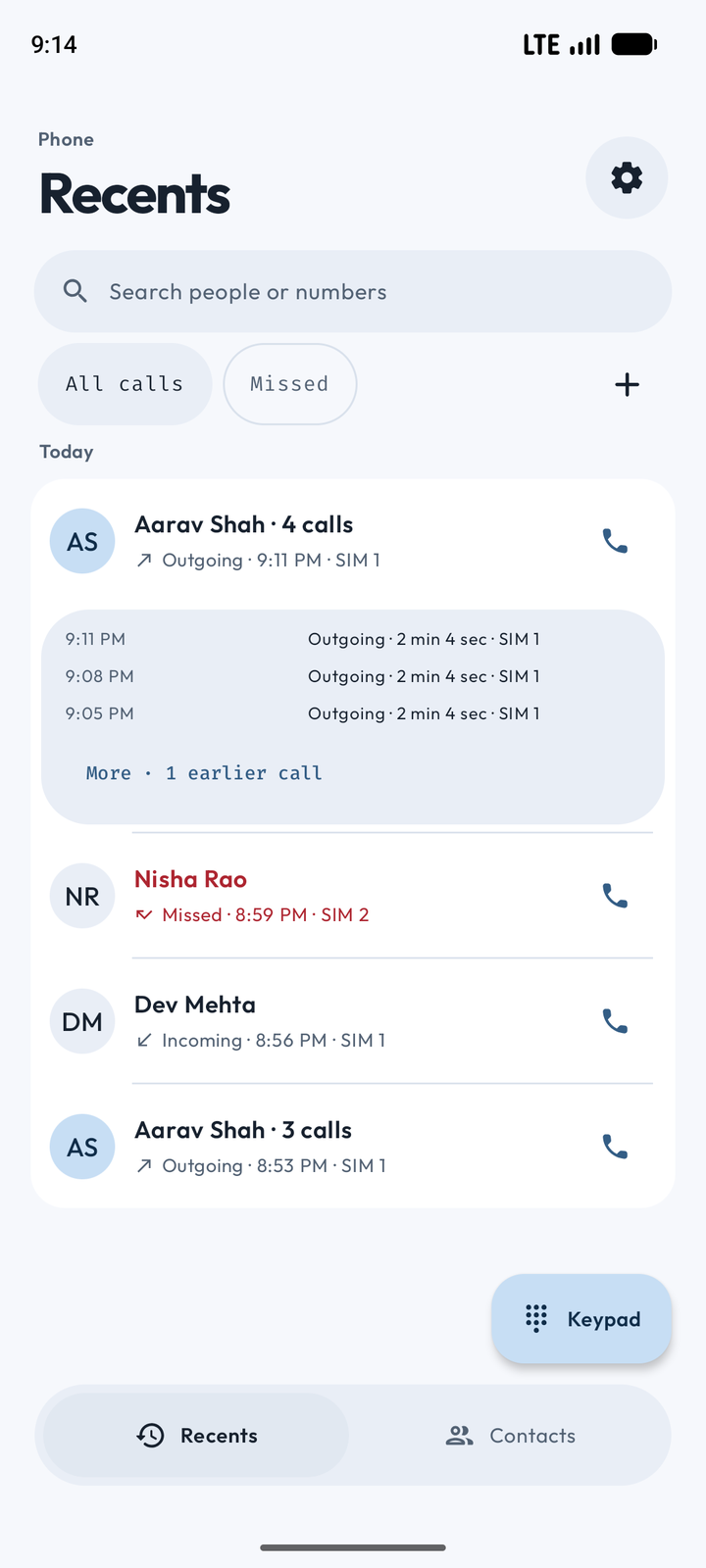
Tely Lunar Android dialer showing grouped outgoing calls, three inline logs, filters and floating navigation
LunarYour everyday dialer. Free.

Less searching.
More connecting.

01Clear call history
02The number you choose
03A look that feels right

THE EVERYDAY DETAILS

Small things.
A better phone day.

The actions you reach for, with a little more care.

01 / CALL HISTORY

History that
keeps the story.

Consecutive calls stay together. Changes in number, direction, SIM or day keep the next run separate. See three logs, then open More.

↗ 4 outgoing↙ 1 incoming↗ 3 outgoing

Pick the filters you want. All calls stays available.
02 / KEYPAD & T9

A number.
A familiar voice.

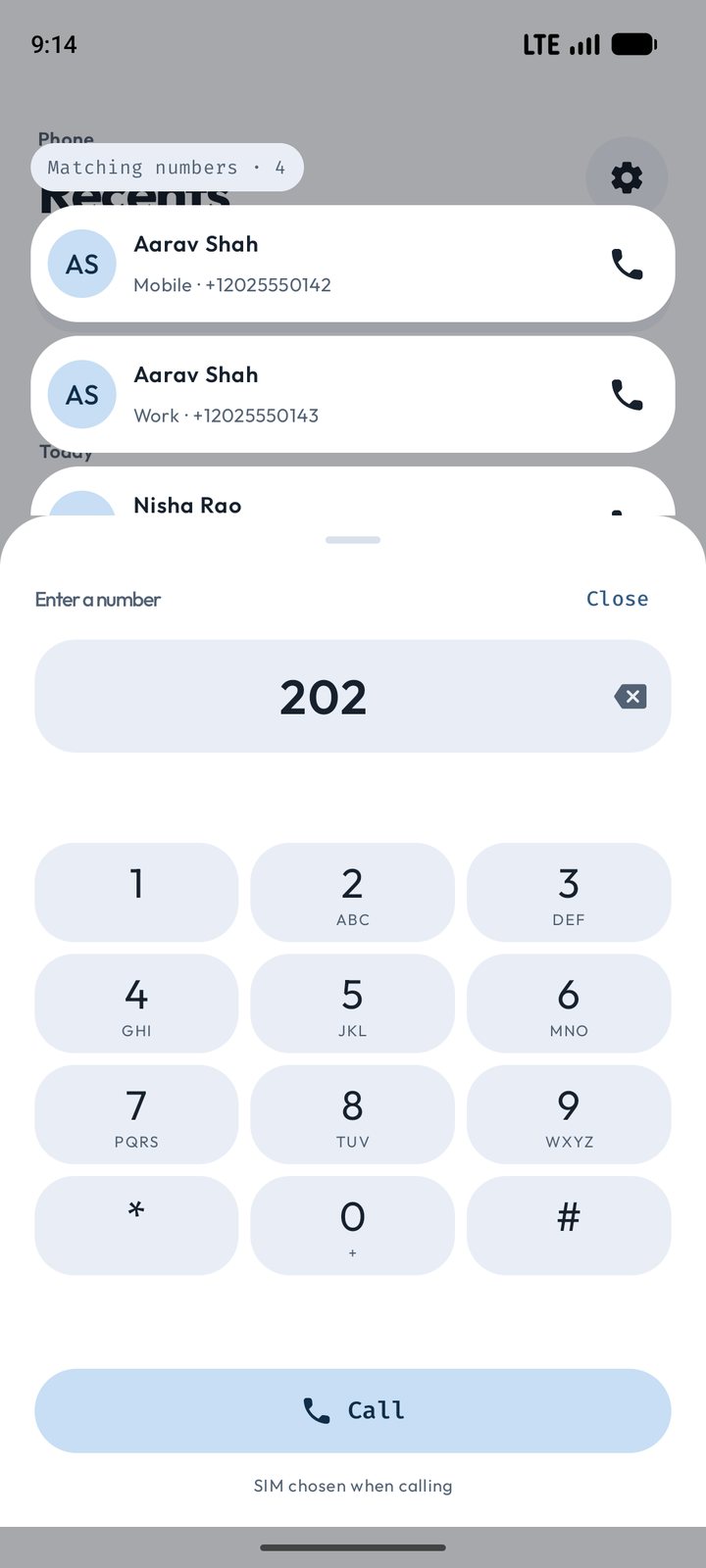
Readable suggestions above the keypad, number-specific Call actions and an editable number inside the deck.

Lunar keypad with contact-number suggestions above the sheet and 202 in its number field
03 / CONTACTS

Call the number
you choose.

Call and Message beside each number. Choose a number for WhatsApp, Telegram or Signal. Add email, address and more when you need them.

CallMessageEmailMore details
04 / YOUR CONTROLS

Your blocklist.
Your choice.

Manage local Decline or Silence rules. Opt into selected public lists, with source details and country filters. The initial verified sources cover Chile and Turkey.

What does protection cover? ↗

ONE APP. FIVE PERSONALITIES.

Find your kind
of familiar.

These are real app screens. Lunar is free; the other four are optional Pro interfaces. Try a real interface for 15 seconds inside the Android app.

Apply a style in the app to match its layout, in-app icons and launcher icon. Your calls and contacts use the same functionality in every interface.

LUNAR / FREE

Lunar

A clear call history, soft shapes and a floating navigation dock.

Real Tely Lunar Android call history interface

Screens shown use the app’s light theme and App fonts. Core calling stays free. Pro plans use Google Play when available; review the plan and price before subscribing. The current build is preparing for internal testing.

COMFORT, IN THE DETAILS

Still your phone.
Just a little more you.

Light, dark or system theme. Optional wallpaper colors. Bundled App fonts or the device’s System font. Wider sheets when your window has room.

↔

Room to breathe. Wide editors use two panes; short landscape keypads keep the controls available.

Aa

Your type. Choose App or System font without changing your interface.

↻

A quicker return. Local display and photo caching help Tely reopen, while Android remains the source for contacts and history.

A FEW GOOD QUESTIONS

Before you
make the switch.

Is Tely free?

Tely is ad-free. Lunar and everyday calling, contacts, call history and blocking are free. Portrait, Tely Ledger, Tely Mosaic and Reach are optional Pro interfaces unlocked through a subscription using Google Play Billing. Prices and billing periods are shown before you subscribe.

How do subscriptions and refunds work?

Google Play Billing handles Pro payments and renewals. Manage or cancel your subscription in Google Play; uninstalling Tely does not cancel it. Refund requests and approved refunds are handled through Google Play, subject to its policies and applicable law. You can also contact Tely support for purchase issues. See our Terms of Service for details.

Can I try the Pro interfaces?

Yes. In the Android app, choose Try for 15 seconds to explore a real interface and navigate its screens. When time expires, Tely returns to your saved interface. A trial does not buy or permanently unlock Pro.

How does call consolidation work?

Only consecutive calls to the same number with the same direction, SIM and day are grouped. An incoming call between outgoing calls keeps them separate. Each run shows its latest three logs; More opens the earlier logs in that run.

Does Tely replace my SMS or messaging app?

Tely opens your SMS app for the number you choose. WhatsApp, Telegram and Signal shortcuts also target your chosen number; those services need to be installed and support it. Tely does not host message conversations or place internet calls.

What permissions does it need?

Calling features need the Android default phone role and relevant phone, contacts, call-log and notification permissions. Call screening needs its own supported access. Tely groups access controls in Settings so you can review their state.

Does it identify all spam calls?

No. You can use local block rules and opt into selected public blocklists. The initial verified catalog has Chile and Turkey sources. Source coverage varies; there is no promise of worldwide or Indian spam-list coverage.

Where are my contacts and history stored?

Contacts and call history remain in Android’s providers. Tely stores a bounded local display snapshot and caches contact photos to reopen faster, then refreshes from Android. App backup is disabled; read the privacy page for network and third-party handoffs.

Which Android devices are supported?

Tely targets Android phones on Android 8.0 and later. Wide windows get adaptive sheets and keypad layouts. Calling, SIM accounts and screening depend on Android, the device and carrier. Physical carrier/OEM and broader device testing continue before public release.

TELY FOR ANDROID

A familiar voice.
A fresh beginning.

Ad-free calling, contacts and history. Lunar is free; four optional interfaces unlock with Pro. Coming soon to Google Play.

Install from Google Play